Have you ever wished to execute operations asynchronously but dependent on one another?
Let’s say you want to download images and apply a filter on them.
NSOperations are great for that use case because they provide you with the ability to perform the same code multiple times, like the task to download an image, and manage dependencies, which allow you to formulate conditions like ‘only start this, after that is finished’.
Using completion blocks, in contrast, can get pretty nasty.
In a nutshell: You can let NSOperations do the work for you, they are automatically running in a background thread and are manageable using dependencies.
What does the setup look like and what are Queues?
As mentioned above, you split apart the work that has to be done and declare it to live inside of an NSOperation.
That can be done either by declaring an NSBlockOperation or subclassing an NSOperation.
If you chose to use NSBlockOperation, you use the convenience initializer init(block block: () -> Void) to declare a unit of work.
Subclassing means, that you overriding the main() method of the NSOperation.
class UpdateClubOperation: NSOperation {

  override func main() {
    //check if operation was not cancelled before doing work
    guard cancelled == false else{return}

    //do your work here
  }

}
If you have initialized your operations, you need to add them to an NSOperationQueue.
Those are responsible for executing operations and managing its state.
Speaking of state, the following picture summarizes the different states and its relations.
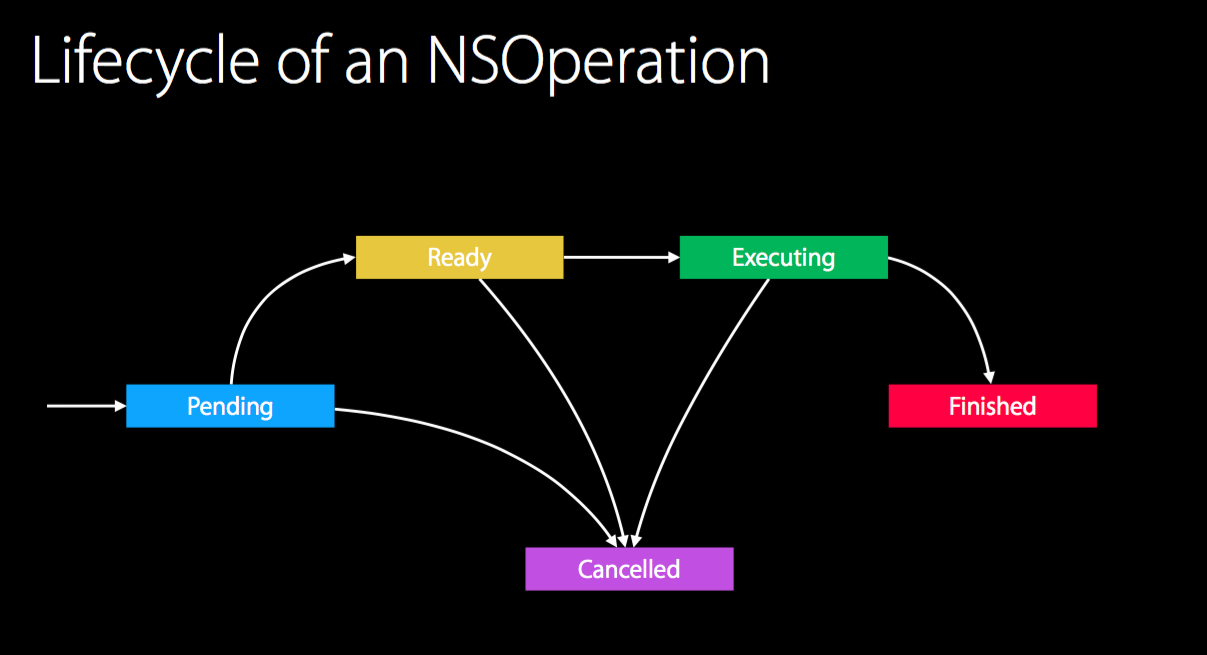
Pending
The operation is scheduled to a queue but not yet ready to execute, meaning that its dependencies are not met.
Ready
Every dependency is fulfilled and the operation is about to execute as soon as the NSOperationQueue is able to do so. Factors as the settable property maxConcurrentOperationCount on the queue affect readiness because it specifies how many operations can be executed at the same time.
If the queue decides it is time for the operation to execute, its state is changed to Executing
Executing
The operation is doing its work. Keep in mind that it can be cancelled any time.
If the work is done, it’s either finished or cancelled.
Finished
Work is done and everybody can go home.
Now, an eventually given completionBlock of the operation is called and the next operation of the queue is executed.
Cancelled
As mentioned above, the cancelled state can be reached at any time so you always have to check if the operation was cancelled.
In this case, the completionBlock is called, too and also the next operation begins executing.
If you chose to subclass, you can override those properties (that are declared as Booleans btw) and manage state by yourself.
NSOperationQueue
As I mentioned earlier, the order of which to execute operations, is managed by an instance of NSOperationQueue (hint: always use one more ‘e’ then you would expect the word to have).
Your job is to create an instance and add operations to the queue, the rest will be done for you.
It spins up a background thread to perform operations, handles its state and makes sure every dependency is met. (Apple doc says ’it is safe to use a single NSOperationQueue object form multiple threads without creating additional locks to synchronize access to that object’)
If you are interested in a serial queue with only one operation being executed at a time, you can set the maxConcurrentOperationCount to 1. Voila, congratulation to your FIFO queue (if you have done your homework regarding dependencies).
In any case, you should take a look at qualityOfService. It specifies the priority of your operations. You can set a low priority by setting the value to .Background or make the operation perform better by setting it to .UserInteractive. If you are not familiar with those quality of service classes, please take a look at what the documentation or code completion says before using them since they can have massive impact on your performance (about two seconds difference between an expensive operation that is performed with .Background against one using .UserInitiated).
Probably the most interesting method of an NSOperationQueue is called addOperation. Use this method to add a single instance of NSOperation to the queue or use addOperations:waitUntilFinished: for adding a bunch of them (waitUntilFinished: indicates that the current thread shall be stopped until the queue is empty if set to true).
Added operations will execute immediately if there are no dependencies to fulfill and the queue is ready.
Did I miss something?
I talked about dependencies all the time but did not explain them, why didn’t you stop me?
Here we go.
let updateClub = UpdateClubOperation()
let operationThatHasToWait = BlurImageOperation()

operationThatHasToWait.addDependency(updateClub)
//do not forget to add the operations to a queue
Yep it’s as simple as that. In this example the images are blurred after the club has updated.
The only thing to remember is:
operationThatHasToWait.addDependency(operationThatHasToFinishFirst)
Cool, but how do I use async APIs like an NSURLSession?
Unfortunately, it is not as easy as it sounds like to use async APIs that depend on completion blocks or delegate methods.
If you do not provide more logic than to start your task, the operation will finish as soon as it leaves the scope of its main method.
class UpdateClubOperation: NSOperation {
  let networkManager = //...
  override func main() {
    //check if operation was not cancelled before doing work
    guard cancelled == false else{return}

    //perform long taking network request
    networkManager.fetchThings(completionHandler: { (newData) -> Void in
      //results are coming in later due to network
    })
  }

}
As you can see in the example, the operation does not wait until your completionHandler is called and ends its execution after fetchThings() is called. Do not rely on the queue to be hold in memory as long as the network task takes. Operations that are dependent on this one may be executed without needed data as this one is not finished fetching.
Semaphores for the rescue!


If you have not heard of semaphores before, let me explain them shortly.
Just as the old fellow railway signal above, semaphores have two states: waiting and ready to go.
If they are closed, the current thread has to wait until they get the signal to clear the way.
In our case, it means that they are able to stop the current thread until the asynchronous request arrives 🚂.
You are dealing with dispatch_semaphore_t which are part of GCD.
The only things that you have to know:
let sem = dispatch_semaphore_create(0)to create a semaphoredispatch_semaphore_wait(sem, <time>)to make a semaphore stop the current thread for the specified time. Please note that you can convert seconds (as Double) into the neededdispatch_timetype by doing it this way:let time = dispatch_time(DISPATCH_TIME_NOW, int64(<your time in sec> * Double(NSEC_PER_SEC))dispatch_semaphore_signal(sem)to let the thread move on
Ok, with this crash-course you are ready to understand the solution to our async callback problem.
We use our fresh learned knowledge to make the current operation wait until the callback arrives 🚅.
class UpdateClubOperation: NSOperation {
  let networkManager = //...

  let sem = dispatch_semaphore_create(0)

  override func main() {
    //check if operation was not cancelled
    guard cancelled == false else{return}

    //perform long taking network request that operates on a new thread
    networkManager.fetchThings(completionHandler: { (newData) -> Void in
      //results are coming in later due to network

      //let the operation finish because the callback has arrived
      dispatch_semaphore_signal(sem)

    })

    let timeToWaitInSec = 10
    let time = dispatch_time(DISPATCH_TIME_NOW, int64(timeToWait * Double(NSEC_PER_SEC))
    //make the semaphore wait ten seconds. If you are very optimistic about your network, use DISPATCH_TIME_FOREVER
    dispatch_semaphore_wait(sem, time)

  }

}
There you go, now your operation should only finish when the async request is done \o/
In conclusion, NSOperation gives you the ability to easily perform tasks on a background thread and to chain them together using dependencies. It can be very helpful if some tasks are dependent on others, like downloading and afterwards processing things. In addition to that, you have refractured this work to a dedicated place.
Remember, that not even an async callback can stop you form reaching your goal. Working with delegates should be thread equally, even though I have not tested it.
Furthermore, you have learned about a semaphore and how they can help you to solve threading issues.
I guess, that is all I can say about NSOperation and NSOperationQueue right now.
If you have any thoughts or do find some spelling mistakes, please contact me :)